Help with Search and Docket Alerts
Since 2009, CourtListener has helped people keep up with new cases and legal topics.
We currently have three kinds of alerts: Search Alerts, Docket Alerts for PACER, and Citation Alerts. Each of these can send emails to your inbox or webhook events to your server.
Docket Alerts for PACER
Docket Alerts allow you to keep up with federal cases and bankruptcies in the PACER system. These alerts monitor tens of thousands of cases across the country for new docket entries and send emails and webhook events whenever new data is found.
Our alerts are only as good as our sources. To learn more about the data sources that trigger alerts see our coverage page.
For active cases, alerts can come within seconds of a new filing. For less active cases, it can take more time or alerts may not arrive at all, if we do not have a source of new information for that case.
In the last 24 hours, 373,094 dockets and 331,880 docket entries were updated.
Limitations
As a non-profit, we aim to provide our services to as many people as possible. We currently allow 5 docket alerts for free, and give a bonus of 10 alerts to anybody with the RECAP Extension installed.
Members can create as many alerts as they need, though we may set up some reasonable limits in the future, based on usage.
Corporate rates are available for large organizations needing to provide alerts to many users. This feature is intended for individual users. If you think you may need to use alerts for a commercial endeavor, please get in touch.
We can sometimes provide need-based exceptions to these rates. If you might need an exception, please let us know.
Creating a Docket Alert
To create a RECAP Alert, find the docket you are interested in following, and press the button on the top that says, " Get Alerts":

That's all there is to it. You'll begin getting alerts as soon as the docket has a new docket entry.
Here's an example of what an email might look like:

(Click for full size version.)
Disabling a Docket Alert
To disable a Docket Alert, find the docket you no longer are interested in, and press the button that says, " Disable Alerts":

Coverage Gaps
A major source we use for our alerts is RSS feeds provided by the courts. Even after supplementing these with the sources listed on our coverage page, we are not always able to provide complete coverage of everything new in PACER. The problem is that some courts do not provide RSS feeds, and others only provide partial ones. The lists below are updated around the clock and provide a summary of which courts provide RSS feeds.
Full RSS Feeds
The courts below have complete RSS feeds, allowing us to always know when cases in these courts are updated.
- N.D. Texas
- S.D. Alabama
- D. Guam
- D. Wyoming
- W.D. Arkansas
- M.D. Louisiana
- E.D. New York
- E.D. Kentucky
- W.D. Louisiana
- N.D. Georgia
- E.D. Missouri
- S.D. Florida
- D. South Carolina
- N.D. West Virginia
- S.D. Illinois
- D. Minnesota
- D. Kansas
- D. Arizona
- N.D. New York
- N.D. Ohio
- D. Colorado
- E.D. Virginia
- M.D. Pennsylvania
- M.D. Tennessee
- D. Connecticut
- D. Nebraska
- W.D. Wisconsin
- W.D. Pennsylvania
- E.D. California
- D. Rhode Island
- N.D. Florida
- D. Delaware
- S.D. Indiana
- S.D. Ohio
- D. Alaska
- C.D. Illinois
- S.D. California
- N.D. California
- S.D. Texas
- S.D. West Virginia
- W.D. Tennessee
- D. North Dakota
- D. Vermont
- E.D. Pennsylvania
- D. Maryland
- N.D. Alabama
- D. New Mexico
- S.D. Iowa
- W.D. Kentucky
- D. Nevada
- W.D. Washington
- N.D. Illinois
- D. Utah
- D. South Dakota
- E.D. Arkansas
- E.D. Tennessee
- D. Puerto Rico
- District of Columbia
- E.D. Washington
- E.D. Michigan
- S.D. New York
- M.D. North Carolina
- W.D. Texas
- N.D. California
- D. Montana
- D. Connecticut
- D. Alaska
- S.D. Mississippi
- E.D. Texas
- D. Puerto Rico
- W.D. Louisiana
- District of Columbia
- S.D. Alabama
- D. Arizona
- E.D. Arkansas
- W.D. Arkansas
- C.D. California
- M.D. Alabama
- S.D. California
- D. Delaware
- M.D. Florida
- S.D. Florida
- C.D. Illinois
- N.D. Indiana
- S.D. Iowa
- D. Kansas
- W.D. Kentucky
- E.D. Louisiana
- E.D. Missouri
- D. Nebraska
- D. Nevada
- D. New Hampshire
- D. New Jersey
- E.D. New York
- E.D. North Carolina
- M.D. North Carolina
- W.D. North Carolina
- S.D. Ohio
- W.D. Oklahoma
- D. Oregon
- E.D. Pennsylvania
- D. Rhode Island
- D. South Carolina
- D. South Dakota
- E.D. Tennessee
- W.D. Tennessee
- S.D. Texas
- W.D. Texas
- D. Vermont
- W.D. Virginia
- E.D. Washington
- W.D. Washington
- N.D. West Virginia
- S.D. West Virginia
- E.D. Wisconsin
- W.D. Wisconsin
- D. Wyoming
- D. Guam
- Federal Claims
Partial RSS Feeds
The courts below only provide some types of documents in their RSS feeds. This means we can send alerts for the types of documents they support and for any content we get from other sources.
You can see which docket entry types are provided by these courts below.
| Tenth Circuit | opinions |
| Fourth Circuit | orders, opinions, judgments |
| Second Circuit | orders, opinions |
| Sixth Circuit | orders,opinions,judgments |
| Federal Circuit | orders,opinions,judgments |
| D.C. Circuit | orders,opinions,judgments |
| Eleventh Circuit | opinions |
| C.D. California | answer,appeal,cmp,court,motion,misc,nef,notice,order |
| D. Hawaii | appeal,motion,order,misc |
| W.D. North Carolina | answer,appeal,court,motion,order |
| M.D. Alabama | answer,appeal,court,motion,order,caseupld,misc |
| N.D. Indiana | answer,appeal,motion,notice,order,plan |
| W.D. Missouri | discharge,epo,order |
| W.D. New York | answer,appeal,court,motion,order,misc,cmp |
| S.D. Georgia | order |
| W.D. Virginia | answer,appeal,court,motion,order |
| N.D. Iowa | answer,appeal,court,motion,order |
| S.D. Mississippi | answer,appeal,court,motion,order,trustee |
| D. Massachusetts | answer,appeal,caseupld,claims,cmp,crbatch,misc,motion,notice,order,plan |
| M.D. Georgia | answer,appeal,court,motion,order |
| D. Idaho | answer,appeal,court,motion,order |
| W.D. Oklahoma | answer,appeal,court,motion,order,trustee |
| D. Oregon | answer,appeal,court,motion,order,trustee,notice |
| D. Montana | answer,appeal,court,motion,order |
| D. New Hampshire | answer,appeal,court,motion,order,auditor,caseupld,claims,cmp,crbatch,crmisc,misc,notice,plan,trustee |
| E.D. Texas | answer,appeal,auditor,caseupld,claims,cmp,court,misc,motion,notice,order,plan,trustee |
| Northern Mariana Islands | answer,appeal,court,motion,order |
| D. Maine | answer |
| E.D. Louisiana | answer,appeal,court,misc,motion,order |
| N.D. Oklahoma | answer,appeal,court,motion,order,misc |
| D. Virgin Islands | answer,appeal,motion,order |
| N.D. Mississippi | answer,appeal,court,motion,order |
| E.D. Wisconsin | answer,appeal,court,misc,motion,order,trustee |
| M.D. Florida | answer,appeal,court,motion,order,misc,caseupld,trustee |
| E.D. Oklahoma | answer,appeal,court,motion,order,trustee |
| D. New Jersey | answer,appeal,court,motion,order,misc,plan |
| W.D. Michigan | order,order-cr,motion |
| D. Minnesota | order,order-cr |
| M.D. Tennessee | order,order-cr,motion |
| S.D. Indiana | adr,answer,appeal,appeal-cr,charge-cr,cmp,cvbevent-cr,detention-cr,discov,discovery-cr,minutes,minutes-cr,misc,misc-cr,misccs,mot2255,motion,notice,notice-cr,order,order-cr,plea-cr,respm,respm-cr,respoth,service,transfer,trial,trial-cr,waiver-cr |
| E.D. California | adr,answer,appeal,cmp,discov,minutes,mot2255,motion,notice,order,respm,respoth,service,transfer,trial |
| D. Colorado | motion,order |
| M.D. Georgia | order,order-cr |
| D. Hawaii | cmp,order,order-cr |
| D. Idaho | allx,motion |
| N.D. Illinois | order,order-cr,motion,cmp |
| S.D. Illinois | motion,order,order-cr,cmp,charge-cr |
| N.D. Iowa | motion |
| W.D. Missouri | order,order-cr,motion |
| D. New Mexico | motion,order,order-cr,answer,appeal,appeal-cr,bankruptcy,cmp,inmate,minutes,misc,misccs,mot2255,notice-cr,reporter,reporter-cr,respm,respm-cr,respoth,service,transfer,transfer-cr,trial,trial-cr |
| N.D. New York | cmp,order,order-cr,motion |
| S.D. New York | adr,answer,appeal,appeal-cr,charge-cr,cmp,discov,discovery-cr,misc,misc-cr,misccs,mot2255,motion,notice,notice-cr,order,order-cr,respm,respm-cr,respoth,service,service-cr,transfer,transfer-cr,trial,trial-cr,waiver-cr,detention-cr,minutes,minutes-cr,plea |
| N.D. Ohio | cmp,order,order_cr,motion,charge_cr |
| W.D. Pennsylvania | order,order-cr,motion,cmp |
| N.D. Texas | order,order-cr,charge-cr,cmp,answer |
| D. Utah | order,order-cr,motion |
| Northern Mariana Islands | order,order-cr,motion |
| M.D. Louisiana | cmp,minutes,minutes-cr,order,order-cr,motion,respm,respm-cr |
| Virgin Islands | order,order-cr |
| D. Maine | order,order-cr |
| D. Massachusetts | answer,appeal,appeal-cr,charge-cr,cmp,detention-cr,discov,discov-cr,minutes,minute-cr,misc,misc-cr,mot2255,motion,notice,notice-cr,order,order-cr,plea-cr,respm,respm-cr,respoth,service,transfer,transer-cr,trial,trial-cr,waiver |
| E.D. Michigan | answer,appeal,appeal-cr,charge-cr,cmp,motion,notice,notice-cr,order,order-cr,petition,petition-cr,respm,respm-cr,respoth,respp,respp-cr |
If you rely on one of these courts, we strongly encourage you to contact the court to request a full and complete PACER RSS feed.
No RSS Feeds
The courts below do not provide RSS feeds of their latest filings. This means our alerts will only be sent when we get updates from other sources.
- Fifth Circuit
- Seventh Circuit
- Eighth Circuit
- Ninth Circuit
- First Circuit
- Third Circuit
- E.D. North Carolina
- W.D. Michigan
- E.D. Virginia
- N.D. Georgia
- D. Maryland
- N.D. Oklahoma
- M.D. Pennsylvania
- N.D. Mississippi
- N.D. Alabama
- N.D. Florida
- S.D. Georgia
- E.D. Kentucky
- W.D. New York
- D. North Dakota
- E.D. Oklahoma
If you rely on one of these courts, we strongly encourage you to contact the court to request a full and complete PACER RSS feed.
Search Alerts
Search alerts are triggered by our search engine and are a powerful way to get fine-tuned alerts on cases or topics that you are following.
Creating Alerts
To create a Search Alert, begin with a search in CourtListener's Case Law, RECAP or Oral Argument database. You can set static calendar dates, or rolling relative dates for your alerts. In the results page, click the bell icon in the search bar () or click the Get Alerts button in the sidebar on the left.

After you click the bell icon () or the Get Alerts button, you will see a pop-up like this, where you can see the filters applied to your alert, how many results it had over the past 100 days, and give it a name and frequency. For RECAP search alerts, you can also choose whether you want alerts for both cases and filings, or for cases only.

The available rates are "Real Time," "Daily," "Weekly," "Monthly," or "Off." Real Time alerts for Case Law are usually delivered within about an hour of when something is published by the court. Real time alerts for oral arguments and the majority of RECAP alerts are batched and delivered every 5 minutes. Daily, weekly, and monthly alerts come at the end of the day, week, and month.
Search alert webhooks for Case Law are delivered at the same time as the alert email. For Oral Argument alerts and the majority of RECAP alerts, webhooks are delivered immediately as we ingest the data, regardless of the alert rate.
Alerts that are Off will not be run. This can be useful for temporarily disabling an alert.
Enabling Real Time Alerts
Real Time alerts are available for Free Law Project members. If you see a message like the one below, you will need to become a member to enable Real Time alerts:

Limitations of Real-Time RECAP Search Alerts
RECAP Search Alerts can be triggered by case-level fields, filing-level fields, or a combination of both. This flexibility introduces complexity, which leads to certain limitations when triggering real-time alerts. For example, suppose you have a real-time alert based on a query like:
caseName:"Lorem vs Dolor" AND description:"Notice of Removal"
Now imagine a case previously named "Ipsum vs Dolor" contains a filing with the description "Notice of Removal". If the case name is later updated to "Lorem vs Dolor", this case would now match the alert query.
However, because the field that causes the match caseName is at the case level and not tied directly to the individual filing, CourtListener cannot detect that a relevant filing now qualifies for the alert. As a result, the alert will not be triggered in real time.
Instead, edge-case alerts like this are processed at the end of the day using a different matching strategy. In such cases, the associated webhooks are also triggered at the end of the day, rather than in real time.
Apart from the edge case described above, real-time search alert emails are triggered within 5 minutes of ingesting a case or filing that matches the alert criteria.
Limitations with Cases that Have Many Parties
To keep the system running smoothly, real-time alerts skip party information for cases with a large number of attorneys. Specifically, if a docket has more than 50 attorneys, the party, attorney, and firm fields won't be used when processing real-time alerts.
This means that if your alert relies on party, attorney, or firm filters, it may not be triggered in real time for these large cases. However, these alerts are still processed at the end of the day using a different matching strategy, so you will still receive them just not in real time.
Limitations with Text-Based Queries and Party Fields
Another known limitation of RECAP Search Alerts is that alerts do not support combined text-based queries involving both party or attorney fields and filing-level fields such as description. For example, the following query will not work as expected:
party:"Michael Jordan" AND attorney:"LeBron James" AND description:goat
This is because party and attorney values are only associated with dockets, not with individual filings, unlike other docket fields.
As a workaround to build alerts that involve party and attorney conditions along with a filing description, use the sidebar filters instead of the main query box.
RECAP Search Alerts for Cases or Filings
For RECAP Search Alerts, you can choose whether you’d like alerts for new cases only, or for both new cases and new filings:

Editing or Deleting a Search Alert
Existing alerts can be edited or deleted from your user profile. By clicking the Edit button, you will be taken back to the search screen with the alert configured for editing. There, you can refine your search, or the name or frequency of the alert.
From your profile page, you can also delete an alert.
Disabling a Search Alert
To temporarily disable an alert, edit it and set the rate to "Off." Every alert email also has a one-click link for disabling the alert that triggered it.
Supported Courts
Search alerts are available for many jurisdictions across the country, and we are frequently expanding our system to support even more locations. To see which courts are currently supported, check our coverage pages, where we list the jurisdictions that we regularly scrape for oral arguments or case law.
If there is a jurisdiction that is not currently listed, please express your interest, and we will do our best to add it to our list.
Citation Alerts
Citation alerts make it possible to keep up with citations to a case of interest. For example, if you are following election law, you might want an alert whenever a new case cites existing landmark cases in your field.
Citation alerts can be configured with custom queries, filters, or jurisdictions. This allows you to set up alerts like:
Whenever the Supreme Court cites Roe v. Wade and mentions the First Amendment, send me an email.
To create a citation alert, start at webpage for the case that interests you. In this example, we will use Roe v. Wade.
On that page, in the sidebar on the left, any cases that cite it are listed, and there is a button to "Get Citation Alerts":
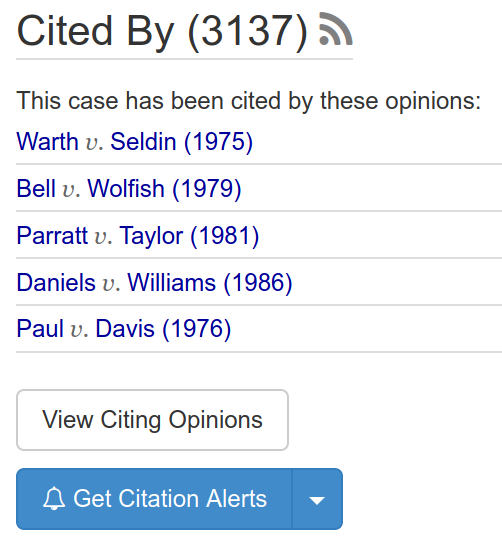
Clicking that button will perform a search in CourtListener that shows the case law that cites Roe v. Wade, and a dialog will appear where you can save the alert.
If you prefer to modify the alert, you can close the dialog that appeared, tweak the query and filters you wish to apply, and then save it as you would any regular alert.
For more on citation alerts, see our blog post announcing this feature.
How to Receive Alerts
You can choose how alerts are delivered:
- Email: Stay informed in your inbox with straightforward notifications. This is the simplest, easiest way to get alerts, and it doesn't require any additional setup.
- Webhooks: For more advanced uses, webhook events can be sent to your applications or services. This option is mainly for developers. Check out the webhook documentation to learn more.
Please Support Open Legal Data
These services are sponsored by Free Law Project and users like you. We provide these services in furtherance of our mission to make the legal sector more innovative and equitable.
We have provided these services for over a decade, and we need your contributions to continue curating and enhancing them.
Will you support us today by becoming a member?